Gestational diabetes log sheet apps 2026
Six apps ranked by one question: at the appointment, what does your care team actually receive?
Your care team’s instructions come first. This guide is about keeping records, not interpreting readings or changing treatment.
The log is only worth what you can hand over
A log sheet is a handover document. It exists so that somebody else can read a fortnight of your life in about a minute: the fasting number, the three after-meal numbers, what you took and what was going on that day.
Most tracking apps are built around the entry screen. Far fewer are built around the page that comes out at the end. That is the gap this ranking is about, and it is why a plain printed sheet still beats a lot of software.
How the apps were ranked
- Does it produce something shaped like a clinic log sheet, a week to a page, one column per check?
- Does that page carry the context your team needs: your units, your targets, how many weeks pregnant you are, and your medication?
- Can you hand it over the way your clinic asks, on paper, as a PDF or as a file?
- Does the record assemble itself correctly, or do you rebuild it from memory the night before?
1. First Fork
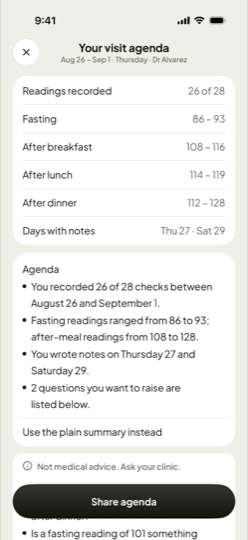
The export is the part of this app that has had the most work. It produces a weekly PDF laid out like a clinic sheet: one row per day, and seven columns for the date, the fasting check, after breakfast, after lunch, after dinner, medication, and your note. A band at the top of the page carries your name, how many weeks pregnant you are, the date range and the targets your clinic gave you, so a reader never has to ask what the numbers are being measured against.
The medication column is worth singling out, because it is the one most apps leave to the notes field. Insulin or metformin, the dose and the time, sit in their own column next to the readings they belong to.
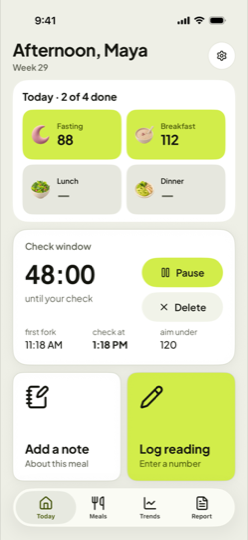
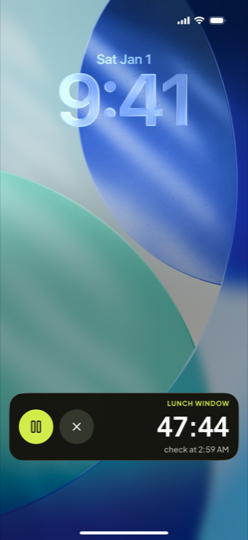
What fills that page correctly is the window. You start it at your first bite, at the interval your clinic asked for, one hour or two, and it runs where you can see it: a Live Activity on the Lock Screen and in the Dynamic Island, an element on the Apple Watch face, a Home Screen widget. You can start it by saying “Start a meal in First Fork” to Siri, or from a Control Center button. Because the reading is entered inside the window it belongs to, it lands in the right column by itself, and the meal column of the sheet fills in without you reconstructing anything.
There is also a CSV export if your clinic or your own spreadsheet wants the raw rows. There is no account and no cloud sync, so nothing leaves the phone unless you send it.
The limits are worth knowing before you commit a pregnancy to it. It is iPhone only and needs iOS 26 or later, it is the youngest app on this page, published in September 2026, and its listing claims no Bluetooth meter sync, so every number is typed by hand. Nothing is sent to your clinic automatically either; the PDF goes where you send it.

2. GDm-Health
On this one question, GDm-Health has an answer nobody else can match: there is no handover, because the readings are already there. They travel to your NHS Trust as you enter them, and the team watching the dashboard can call you back through the app. The catch is that it only works if your clinic runs the other end of it. If your care team gave you this one, use it, whatever any page on the internet says.
3. Gestational Diabetes Tracker
Written by a developer who had gestational diabetes herself. You start a meal, it schedules the one-hour and two-hour reminders, and you can attach the reading to its meal afterwards, filter the history and export a PDF. A solid, straightforward handover from an app that understands the routine it is for.
4. mySugr
A general diabetes logbook with a well-regarded report, though reports and reminders sit in the paid tier. A paired Accu-Chek meter logs readings by itself, which is the easiest kind of accuracy there is. The report is built around long-term diabetes measures rather than a pregnancy’s four checks a day, and the listing does not mention gestational diabetes.
5. Malama
Made for gestational diabetes, and strong at the capture end: Bluetooth meter sync, Apple Health, meal tags, photos and carb notes, plus analysis that looks for foods linked to high readings and access to prenatal nutritionists. Its listing describes sharing with its own care team rather than producing a sheet you print and carry, so what you hand to your own clinic is less clear than the rest of it.
6. Glucose Buddy
Exports PDF and CSV and connects to Dexcom and Apple Health, so the file exists. The layout is a general diabetes log rather than a pregnancy sheet, and your care team will be reading past A1C tools and long-term plans to find the four numbers they wanted.
Choosing in a minute
- Your clinic gave you an app: use that one, and stop reading here.
- You want a page that looks like the sheet your clinic already uses: First Fork.
- You are in the UK and your Trust uses it: GDm-Health.
- Your meter has Bluetooth: Malama. Accu-Chek: mySugr. Dexcom: Glucose Buddy.
- You use Android: mySugr or Glucose Buddy, and check their listings first.
The paper sheet is the baseline, not the loser
ACOG asks for a record you bring to every prenatal visit and accepts one kept on paper. A complete paper log beats a half-filled app every single time, and the free weekly sheet below is laid out with the same columns as the export described above. The only real argument for an app is that the check is easier to remember when something on your screen is counting down. If paper works for you, paper is the right answer.
Sources
- ACOG, Gestational Diabetes patient FAQ.
- Apple App Store listings for First Fork, GDm-Health, Gestational Diabetes Tracker, mySugr, Malama and Glucose Buddy, all read on 22 October 2026.